The AFR State Expenditure Codes upload file is a .tsv (tab-separated values) text file.
Use this file to import AFR Expenditure Crosswalk codes on the PA Annual Financial Report - State Expenditures page.
The following table lists the field names, descriptions, and the Destination field for the AFR Expenditure Crosswalk upload file.
|
Field Name |
Description |
Destination field |
|---|---|---|
|
Fund |
The state-defined expenditure fund code. |
The value is imported into the Fund field on the PA Annual Financial Report - State Expenditures page. |
|
Function |
The state-defined expenditure function code. |
The value is imported into the Function field on the PA Annual Financial Report - State Expenditures page. |
|
Object |
The state-defined expenditure object code. |
The value is imported into the Object field on the PA Annual Financial Report - State Expenditures page. |
|
Elementary |
Indicates whether the expenditure is for Kindergarten through the Sixth Grade. The valid value is E. |
The value is used to select the Elementary option on the PA Annual Financial Report - State Expenditures page. |
|
Secondary |
Indicates whether the expenditure is for the Seventh Grade through the Twelfth Grade. The valid value is S. |
The value is used to select the Secondary option on the PA Annual Financial Report - State Expenditures page. |
|
Federal |
Indicates whether the expenditure represents those costs funded by federal revenues. The valid value is F. |
The value is used to select the Federal option on the PA Annual Financial Report - State Expenditures page. |
|
Total |
Indicates whether a total needs to be reported for the combination of the function and object code record. The valid value is T. |
The value is used to select the Total option on the PA Annual Financial Report - State Expenditures page. |
|
LEA-Wide |
Indicates whether the expenditure is reported LEA-wide. The valid value is L. |
The value is used to select the LEA-Wide option on the PA Annual Financial Report - State Expenditures page. |
Example
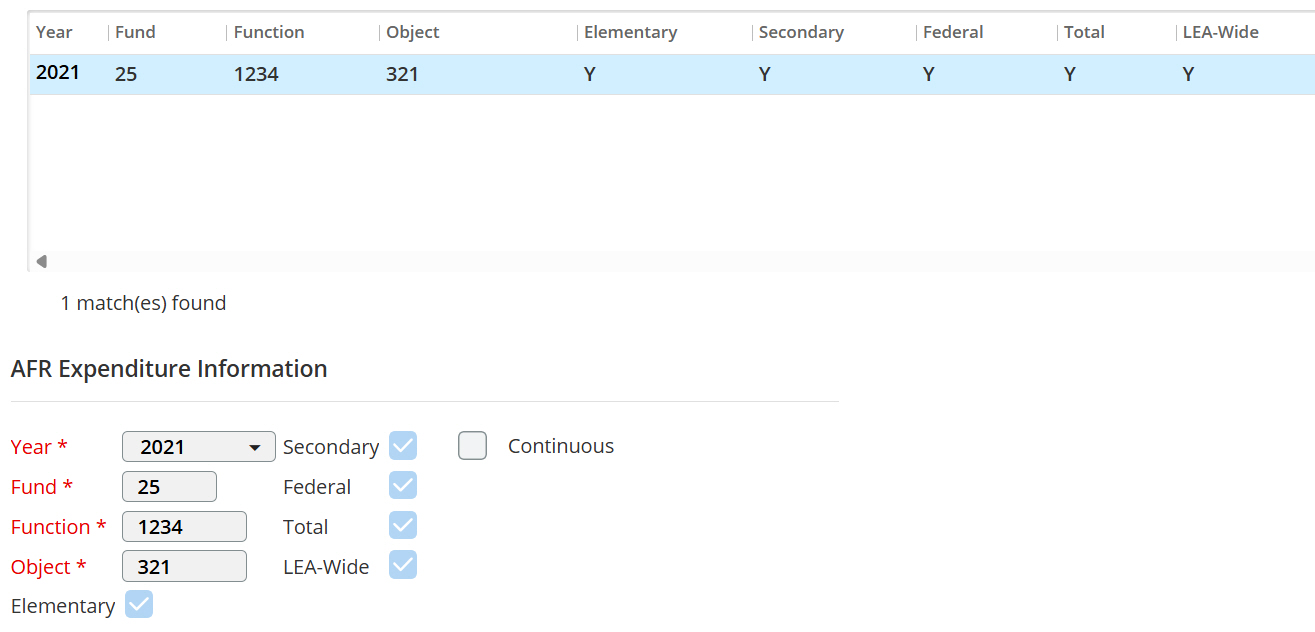
The following is an example row in the import file:
25 1234 321 ESFTL
After this row is imported, the system creates the following record on the PA Annual Financial Report - State Expenditures page.