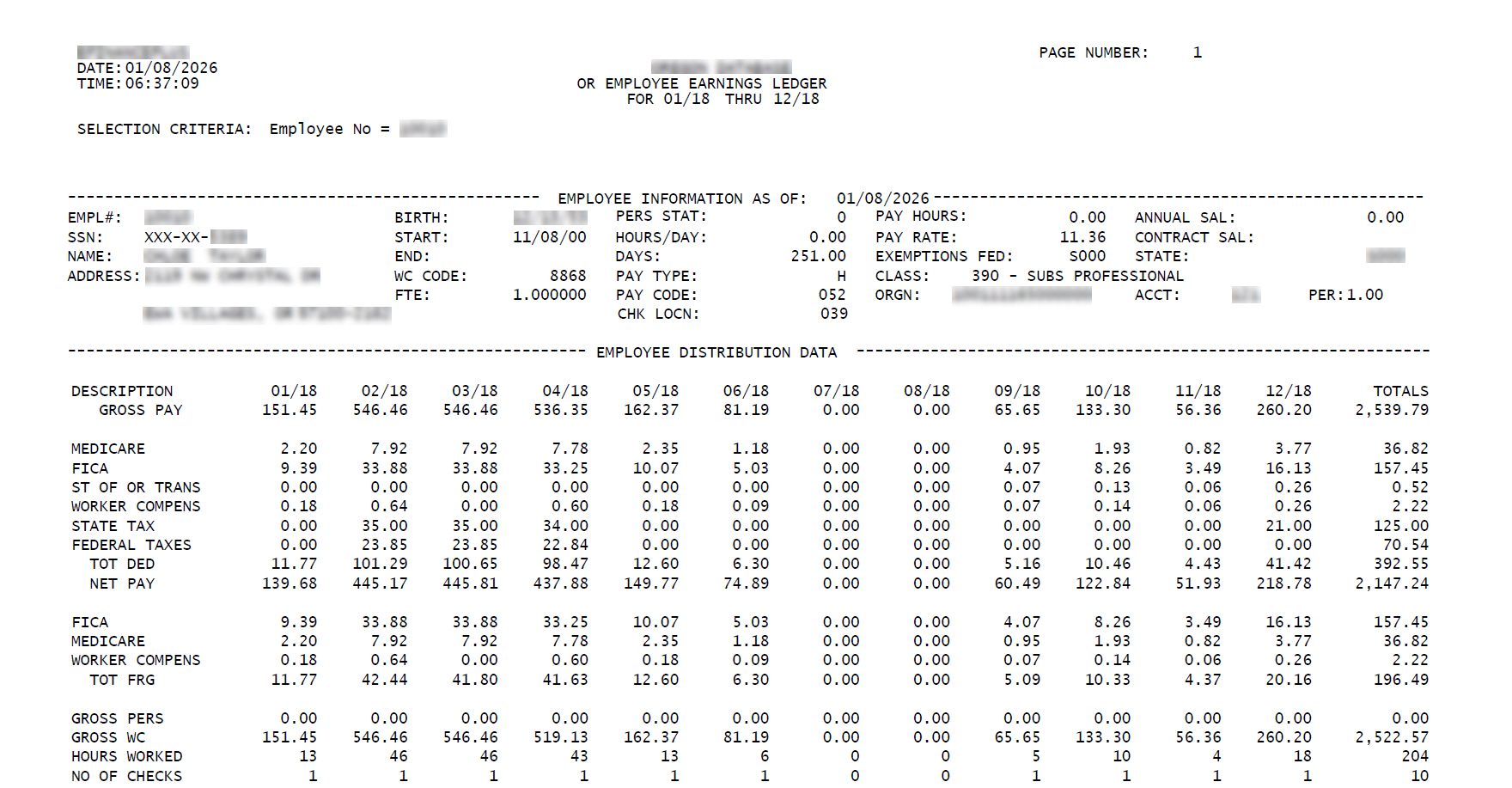
Employee Ledger Report - File Layout and Data Mapping - Employee Distribution Data Section - Statistical Data (Record Type 4)
Statistical Data (Record Type 4) includes four types of calculated metrics that are computed for each unique check processed:
GROSS PERS
This line displays the PERS-eligible gross per month.
FLSA overtime wages may be included in PERS fringe gross if the pay code is subject to PERS retirement contributions.
The following table lists the columns, descriptions, and data sources or valid values for the Gross PERS line in the Statistical Data record (Type 4) in the Employee Distribution Data section of the Employee Ledger report.
Column | Description | Data source and Valid values |
|---|---|---|
1-14 | GROSS PERS | Not applicable |
15-23 | January amount | Calculated during report generation. Maximum Fringe Gross from the Check History Detail (checkhi2) table where the pay date month is January, earn_ded = D (Deduction), and the deduction code is a PERS retirement deduction (pre-tax or after-tax). |
24-32 | February amount | Calculated during report generation. Maximum Fringe Gross from the Check History Detail (checkhi2) table where the pay date month is February, earn_ded = D (Deduction), and the deduction code is a PERS retirement deduction (pre-tax or after-tax). |
33-41 | March amount | Calculated during report generation. Maximum Fringe Gross from the Check History Detail (checkhi2) table where the pay date month is March, earn_ded = D (Deduction), and the deduction code is a PERS retirement deduction (pre-tax or after-tax). |
42-50 | April amount | Calculated during report generation. Maximum Fringe Gross from the Check History Detail (checkhi2) table where the pay date month is April, earn_ded = D (Deduction), and the deduction code is a PERS retirement deduction (pre-tax or after-tax). |
51-59 | May amount | Calculated during report generation. Maximum Fringe Gross from the Check History Detail (checkhi2) table where the pay date month is May, earn_ded = D (Deduction), and the deduction code is a PERS retirement deduction (pre-tax or after-tax). |
60-68 | June amount | Calculated during report generation. Maximum Fringe Gross from the Check History Detail (checkhi2) table where the pay date month is June, earn_ded = D (Deduction), and the deduction code is a PERS retirement deduction (pre-tax or after-tax). |
69-77 | July amount | Calculated during report generation. Maximum Fringe Gross from the Check History Detail (checkhi2) table where the pay date month is July, earn_ded = D (Deduction), and the deduction code is a PERS retirement deduction (pre-tax or after-tax). |
78-86 | August amount | Calculated during report generation. Maximum Fringe Gross from the Check History Detail (checkhi2) table where the pay date month is August, earn_ded = D (Deduction), and the deduction code is a PERS retirement deduction (pre-tax or after-tax). |
87-95 | September amount | Calculated during report generation. Maximum Fringe Gross from the Check History Detail (checkhi2) table where the pay date month is September, earn_ded = D (Deduction), and the deduction code is a PERS retirement deduction (pre-tax or after-tax). |
96-104 | October amount | Calculated during report generation. Maximum Fringe Gross from the Check History Detail (checkhi2) table where the pay date month is October, earn_ded = D (Deduction), and the deduction code is a PERS retirement deduction (pre-tax or after-tax). |
105-113 | November amount | Calculated during report generation. Maximum Fringe Gross from the Check History Detail (checkhi2) table where the pay date month is November, earn_ded = D (Deduction), and the deduction code is a PERS retirement deduction (pre-tax or after-tax). |
114-122 | December amount | Calculated during report generation. Maximum Fringe Gross from the Check History Detail (checkhi2) table where the pay date month is December, earn_ded = D (Deduction), and the deduction code is a PERS retirement deduction (pre-tax or after-tax). |
123-132 | Annual total | Calculated during report generation. Sum of all monthly amounts. |
GROSS WC
This line displays the Workers' Compensation gross per month.
FLSA overtime wages may be included in Workers' Compensation fringe gross (frngross from checkhi2 where earn_ded = 'W'), depending on how the pay code is configured.
The following table lists the columns, descriptions, and data sources or valid values for the Gross WC line in the Statistical Data record (Type 4) in the Employee Distribution Data section of the Employee Ledger report.
Column | Description | Data source and Valid values |
|---|---|---|
1-14 | GROSS WC | Not applicable |
15-23 | January amount | Calculated during report generation. Maximum Fringe Gross from the Check History Detail (checkhi2) table where the pay date month is January and earn_ded = W (Workers' Compensation) for the check. |
24-32 | February amount | Calculated during report generation. Maximum Fringe Gross from the Check History Detail (checkhi2) table where the pay date month is February and earn_ded = W (Workers' Compensation) for the check. |
33-41 | March amount | Calculated during report generation. Maximum Fringe Gross from the Check History Detail (checkhi2) table where the pay date month is March and earn_ded = W (Workers' Compensation) for the check. |
42-50 | April amount | Calculated during report generation. Maximum Fringe Gross from the Check History Detail (checkhi2) table where the pay date month is April and earn_ded = W (Workers' Compensation) for the check. |
51-59 | May amount | Calculated during report generation. Maximum Fringe Gross from the Check History Detail (checkhi2) table where the pay date month is May and earn_ded = W (Workers' Compensation) for the check. |
60-68 | June amount | Calculated during report generation. Maximum Fringe Gross from the Check History Detail (checkhi2) table where the pay date month is June and earn_ded = W (Workers' Compensation) for the check. |
69-77 | July amount | Calculated during report generation. Maximum Fringe Gross from the Check History Detail (checkhi2) table where the pay date month is July and earn_ded = W (Workers' Compensation) for the check. |
78-86 | August amount | Calculated during report generation. Maximum Fringe Gross from the Check History Detail (checkhi2) table where the pay date month is August and earn_ded = W (Workers' Compensation) for the check. |
87-95 | September amount | Calculated during report generation. Maximum Fringe Gross from the Check History Detail (checkhi2) table where the pay date month is September and earn_ded = W (Workers' Compensation) for the check. |
96-104 | October amount | Calculated during report generation. Maximum Fringe Gross from the Check History Detail (checkhi2) table where the pay date month is October and earn_ded = W (Workers' Compensation) for the check. |
105-113 | November amount | Calculated during report generation. Maximum Fringe Gross from the Check History Detail (checkhi2) table where the pay date month is November and earn_ded = W (Workers' Compensation) for the check. |
114-122 | December amount | Calculated during report generation. Maximum Fringe Gross from the Check History Detail (checkhi2) table where the pay date month is December and earn_ded = W (Workers' Compensation) for the check. |
123-132 | Annual total | Calculated during report generation. Sum of all monthly amounts. |
HOURS WORKED
This line displays the total hours worked per month.
Hours from FLSA overtime pay codes are included in the SUM(hours) calculation from checkhi2 where earn_ded = P.
The following table lists the columns, descriptions, and data sources or valid values for the Hours Worked line in the Statistical Data record (Type 4) in the Employee Distribution Data section of the Employee Ledger report.
Column | Description | Data source and Valid values |
|---|---|---|
1-14 | HOURS WORKED | Not applicable |
15-23 | January amount | Calculated during report generation. Sum of Hours from the Check History Detail (checkhi2) table where the pay date month is January and earn_ded = P (Pay/Earnings) for the check. |
24-32 | February amount | Calculated during report generation. Sum of Hours from the Check History Detail (checkhi2) table where the pay date month is February and earn_ded = P (Pay/Earnings) for the check. |
33-41 | March amount | Calculated during report generation. Sum of Hours from the Check History Detail (checkhi2) table where the pay date month is March and earn_ded = P (Pay/Earnings) for the check. |
42-50 | April amount | Calculated during report generation. Sum of Hours from the Check History Detail (checkhi2) table where the pay date month is April and earn_ded = P (Pay/Earnings) for the check. |
51-59 | May amount | Calculated during report generation. Sum of Hours from the Check History Detail (checkhi2) table where the pay date month is May and earn_ded = P (Pay/Earnings) for the check. |
60-68 | June amount | Calculated during report generation. Sum of Hours from the Check History Detail (checkhi2) table where the pay date month is June and earn_ded = P (Pay/Earnings) for the check. |
69-77 | July amount | Calculated during report generation. Sum of Hours from the Check History Detail (checkhi2) table where the pay date month is July and earn_ded = P (Pay/Earnings) for the check. |
78-86 | August amount | Calculated during report generation. Sum of Hours from the Check History Detail (checkhi2) table where the pay date month is August and earn_ded = P (Pay/Earnings) for the check. |
87-95 | September amount | Calculated during report generation. Sum of Hours from the Check History Detail (checkhi2) table where the pay date month is September and earn_ded = P (Pay/Earnings) for the check. |
96-104 | October amount | Calculated during report generation. Sum of Hours from the Check History Detail (checkhi2) table where the pay date month is October and earn_ded = P (Pay/Earnings) for the check. |
105-113 | November amount | Calculated during report generation. Sum of Hours from the Check History Detail (checkhi2) table where the pay date month is November and earn_ded = P (Pay/Earnings) for the check. |
114-122 | December amount | Calculated during report generation. Sum of Hours from the Check History Detail (checkhi2) table where the pay date month is December and earn_ded = P (Pay/Earnings) for the check. |
123-132 | Annual total | Calculated during report generation. Sum of all monthly amounts. |
NO OF CHECKS
This line displays the number of paychecks per month.
The following table lists the columns, descriptions, and data sources or valid values for the No Of Checks line in the Statistical Data record (Type 4) in the Employee Distribution Data section of the Employee Ledger report.
Column | Description | Data source and Valid values |
|---|---|---|
1-14 | NO OF CHECKS | Not applicable |
15-23 | January amount | Calculated during report generation. For each unique combination of Employee Number, Check Number, and Pay Date, the system increments the count by 1 for the corresponding month. |
24-32 | February amount | Calculated during report generation. For each unique combination of Employee Number, Check Number, and Pay Date, the system increments the count by 1 for the corresponding month. |
33-41 | March amount | Calculated during report generation. For each unique combination of Employee Number, Check Number, and Pay Date, the system increments the count by 1 for the corresponding month. |
42-50 | April amount | Calculated during report generation. For each unique combination of Employee Number, Check Number, and Pay Date, the system increments the count by 1 for the corresponding month. |
51-59 | May amount | Calculated during report generation. For each unique combination of Employee Number, Check Number, and Pay Date, the system increments the count by 1 for the corresponding month. |
60-68 | June amount | Calculated during report generation. For each unique combination of Employee Number, Check Number, and Pay Date, the system increments the count by 1 for the corresponding month. |
69-77 | July amount | Calculated during report generation. For each unique combination of Employee Number, Check Number, and Pay Date, the system increments the count by 1 for the corresponding month. |
78-86 | August amount | Calculated during report generation. For each unique combination of Employee Number, Check Number, and Pay Date, the system increments the count by 1 for the corresponding month. |
87-95 | September amount | Calculated during report generation. For each unique combination of Employee Number, Check Number, and Pay Date, the system increments the count by 1 for the corresponding month. |
96-104 | October amount | Calculated during report generation. For each unique combination of Employee Number, Check Number, and Pay Date, the system increments the count by 1 for the corresponding month. |
105-113 | November amount | Calculated during report generation. For each unique combination of Employee Number, Check Number, and Pay Date, the system increments the count by 1 for the corresponding month. |
114-122 | December amount | Calculated during report generation. For each unique combination of Employee Number, Check Number, and Pay Date, the system increments the count by 1 for the corresponding month. |
123-132 | Annual total | Calculated during report generation. Sum of the number of checks. |